
Green WhatsApp button
Memo, challan, advance, POD, bill and receipt go to the party or the truck owner in one click, with the PDF.
VCS / Transport ERP / For brokers
VCS Transport ERP · For brokers & commission agents
Memo, challan, advance, POD and bill go on WhatsApp in one click. A warning before a loss-making truck moves. Owner TDS and RTGS handled, every rupee you owe in view.
Transport broker software manages hired (market) trucks from booking to final payment. In VCS Transport ERP a broker or commission agent makes the lorry hire slip, pays the advance by cash, NEFT, diesel or FASTag, records the owner’s PAN and TDS declaration, keeps RTGS details, releases the balance after approval, and sees what is owed to every broker and owner by age.
Need the truck first? Vehicle Placement gets rates from all your brokers on WhatsApp, cheapest first.
Broker module + WhatsApp
No typing on WhatsApp, no photos of papers. Press the green button.
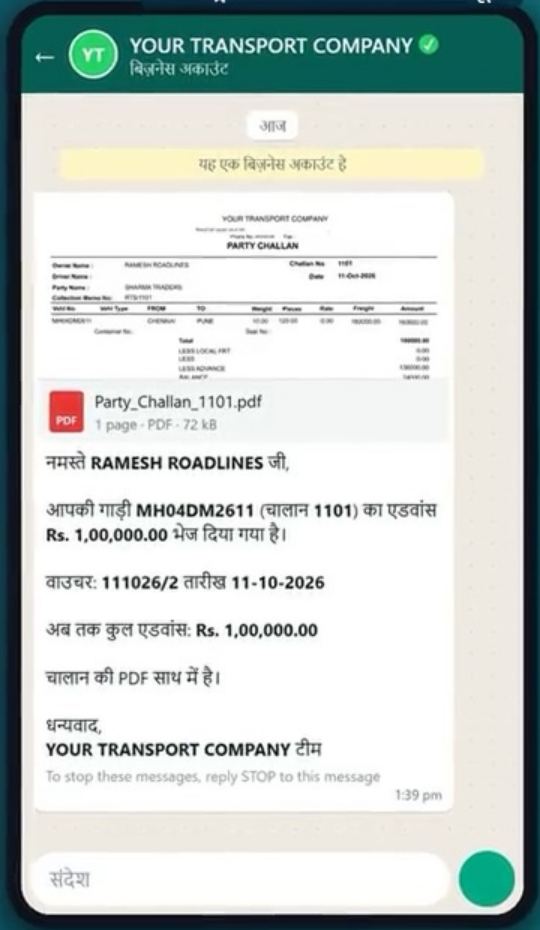
Memo, challan, advance, POD, bill and receipt go to the party or the truck owner in one click, with the PDF.
Challan and advance details reach the truck owner in Hindi, so there are no calls asking what was sent.
The owner gets the day’s full account on WhatsApp every evening, by itself.
Before you load
Know the loss, check the truck and the driver. On the screens your staff already use.
Type the freight on the challan and the software warns you if the trip will make a loss. The owner gets an alert on WhatsApp too.
Type the truck number. Owner, insurance, fitness, permit, PUC and tax dates come up in seconds, from government records.
Check the licence online before you hand over goods: valid or not, for which vehicles, and whether it is blacklisted.
Built in
Hire slip with challan and annexure, LRs attached, freight by weight, rate or fixed amount.
Pay the advance in cash, NEFT to broker or owner, diesel slips or FASTag, all on the hire slip.
PAN and TDS declaration captured per owner; TDS on hire slips and broker-wise TDS reports for Section 194C.
Broker and owner bank details on file; RTGS-format bank report for the day’s payments.
Advance and balance approvals by the people you choose; a POD due date and penalty for late POD.
Broker-wise ageing (within terms vs overdue) plus broker ledgers and the MSME register.
Profit on every trip, loss-making trips on top, and where each trip is stuck: memo, POD, bill or payment.
The memo’s advance is cut in the transporter bill by itself. No working it out again.
Receipt against each bill, with TDS deducted and the balance shown, and sent on WhatsApp.

Before vs after
| Without VCS | With VCS Transport ERP |
|---|---|
| Owner calls every day asking for his balance | Balance status visible; paid after POD and approval |
| PAN and TDS declarations in a file somewhere | Captured on the hire slip, TDS reports ready |
| Bank details typed again for every RTGS | Stored once; RTGS format ready |
| No idea how much is overdue to whom | Broker-wise ageing on the dashboard |
| Typing every paper on WhatsApp | One green button, with the PDF |
| Loss known after the trip | Warning before the truck moves |
FAQ
Transport broker software manages hired trucks from booking to final payment: lorry hire slip, advance, owner PAN and TDS, POD, balance payment and what you owe each broker or owner. VCS Transport ERP does all of this in one place.
Yes. Every broker screen in VCS Transport ERP has a green WhatsApp button. Memo, receipt, challan, advance, POD and bill go to the party or the truck owner in one click, with the PDF, and the truck owner gets his message in Hindi.
Yes. When you type the freight on the challan, VCS Transport ERP tells you if the trip will make a loss, before the truck moves, and can alert the owner on WhatsApp. The broker MIS then shows profit and loss on every trip.
On the lorry hire screen in VCS Transport ERP, type the truck number. The owner’s name and the insurance, fitness, permit, PUC and tax dates come up from government records. You can also check the driver’s licence online before you hand over the goods, including whether it is blacklisted.
Yes. VCS records the owner’s PAN and TDS declaration on the lorry hire slip, applies TDS where it is due and gives broker-wise and hire-slip-wise TDS reports for Section 194C.
Yes. The advance on a hire slip can be cash, NEFT to the broker or owner, diesel slips or FASTag, and the balance is worked out automatically.
Yes. Balance payments go through an approval step, each hire slip carries a POD due date, and a penalty for late POD can be set.
Yes. The party pays by link, and the MR is made automatically with the bank reference. No matching against the bank statement. From the to-pay or paid MR, or the debtor receipt, press Send Payment Request: the party gets the link by SMS, and you can share it on WhatsApp too. They pay by UPI, card or net banking, straight to your bank account. Debtor receipts are bill-wise, with TDS deducted. One report shows what came in, what is pending and what failed, and any payment without a receipt is flagged at the top.
Yes. Payments completed in your digital trucker-payment app are fetched into VCS Transport ERP and posted automatically as lorry advance, lorry balance or expense vouchers. No typing again. Each payment shows transferred, with its voucher number, or pending, with the reason.
The dashboard shows broker-wise ageing (what is within terms and what is overdue) and each broker has a ledger.
Bring one memo and one truck owner’s details. In the demo we make the challan, check the margin and send it on WhatsApp.
Call 98216 05790 · 80809 20274 · 91520 48770